
Activate it, enter one contact address, and you are done. The signing keys are generated on first use.
Colours, shapes, placement, timing and copy, all decided in the admin screen with a live preview beside you.
No charge by subscriber count, no charge by message volume. Anyone can download it from WordPress.org, and the licence is GPL.
Your subscriber list lives in your own database, and your site talks to the browser push services directly.
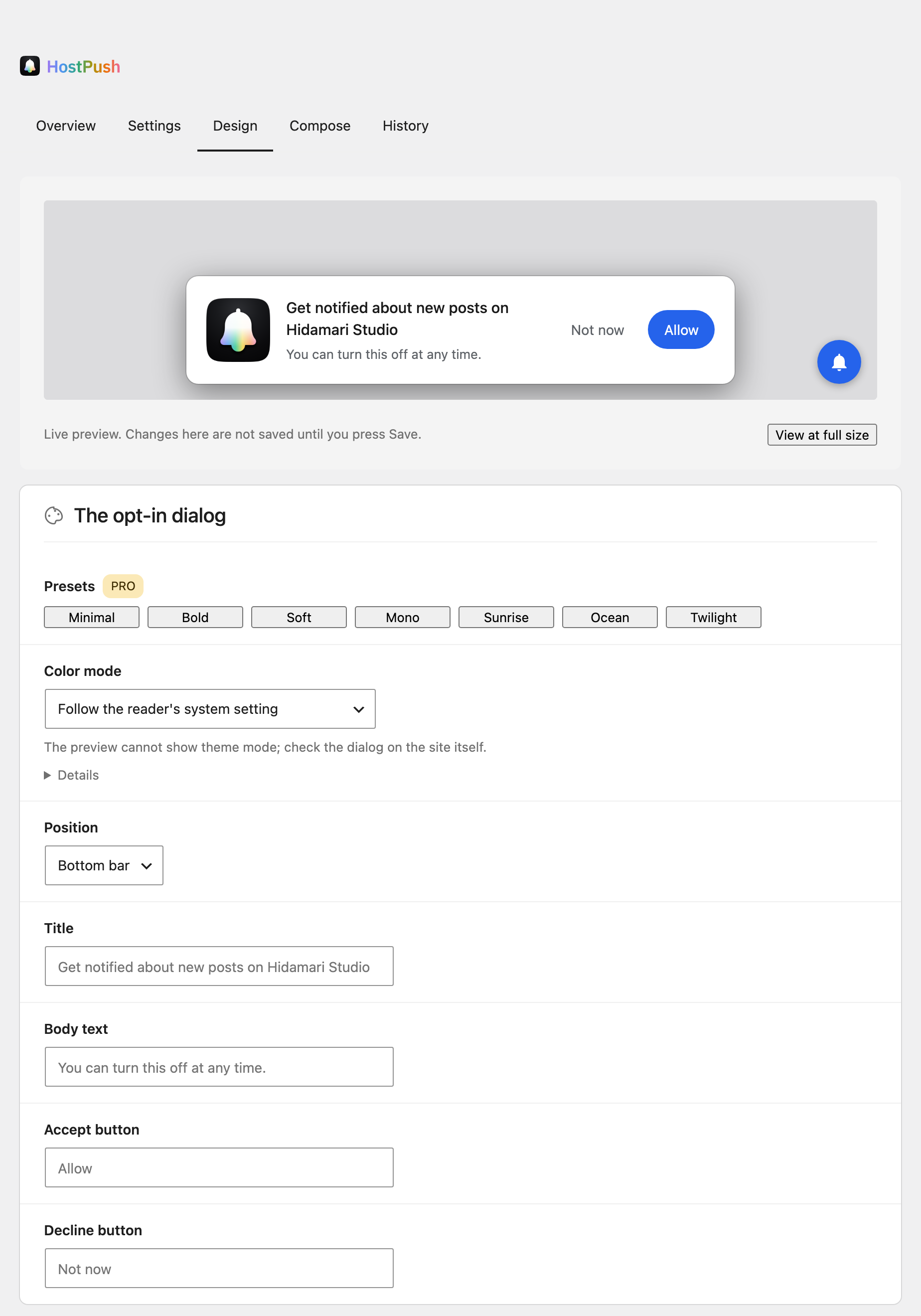
The dialog paints itself from the colours you set rather than from the theme, so it keeps its look through a theme change. Every adjustment is a setting, and the preview on the same screen follows as you type.
These controls are in the add-on. The free plugin ships the default look, the Additional CSS box, and this same preview.
Choose when it appears. Immediately, after a delay, or once the reader has scrolled, and from whichever visit number you pick.
A reader who passes gets another chance. Set the wait before asking again separately for the first, second and third time onwards, and the bell is there whenever they change their mind.
The first notification arrives on subscribe. A welcome notification tells the reader it worked, and proves to you that the whole delivery path is open.
Pick a ready-made look, tune it setting by setting, or write your own CSS. The bell is drawn from the same tokens as the dialog, so a choice made once reaches both.
Delivery runs on the free plugin from end to end. Pro adds 5 things — the design controls, sending by category, and three more — and those are the rows marked PRO.
The things worth checking when you put push notification plugins side by side. What follows is PushBell’s answer to each.
Moving from Perfecty Push Notifications leaves every reader subscribed exactly as they are, from wherever they are. Nobody grants permission again, and nobody has to visit the site for it to take effect.
An Import screen appears while the other plugin is still there. Two presses move the signing keys across and copy every subscriber, each keeping the date they subscribed on.
The other plugin’s records are only ever read, so your way back stays exactly where it was.
From the very first send after the switch, notifications render properly on the old service worker.
Once the new subscription is safely stored, the registration it replaced is retired, so each reader stays subscribed once and receives each post once.
Only that one worker is touched. Every other service worker on the site stays registered, your PWA included.
Readers who allowed notifications under an earlier tool, OneSignal included, become subscribers here on their next visit. Nothing is asked of them and no prompt appears, and that tool’s worker is retired at the same time, so each post arrives once.
The FAQ on the plugin page walks through what the screen does at each step, and why the order matters.
The less you hold, the shorter your privacy policy gets and the lighter the whole thing is to run.
A subscription identifies a browser, not a person. Suggested privacy policy text is added to your site’s draft as soon as you activate the plugin.
Share a screenshot of the settings screen as it is. The signing key is never drawn on it.
Subscribe and unsubscribe are rate limited. On a salted hash of the caller’s address, held only for the length of the window.
A subscription is identified by the address the reader’s own browser made. No id naming a subscriber ever reaches the page.
Every setting reaches the front end as JSON data. Nothing you type is interpolated into markup.
The free plugin is a complete product on its own. Add the add-on when you want the look set from the admin, or delivery shaped more deliberately.
Readers pick the categories they care about as they subscribe, and a send reaches only the people who asked for that one.
Pick the hour your readers are actually looking. Set the date and time and leave it.
Add up to two shortcuts to a notification, each pointing somewhere of its own.
See which broadcasts got read, as a number, and let that shape what you send next.
Colours, corner radii, shadow, placement, wording, colour mode and the bell's look, all set from the admin against a live preview. Start from one of four ready-made looks, then adjust any field by hand.
Chrome, Edge, Firefox and Opera on desktop and Android. Safari on macOS. On iPhone and iPad, readers subscribe from a site they have added to the Home Screen.
The admin screen breaks your subscribers down by browser, so you can see where they actually come from.
All of it comes as standard on ordinary shared hosting. No external libraries to install, and no build step.
Deleting PushBell from the Plugins screen takes its tables, its options, the meta it wrote on your posts and its scheduled events with it. What you are left with is the database you had before — which is what makes the first install a small decision.
It keeps your database clean. While it is installed, it writes only to its own four tables and its own handful of options. Notifications are rows in its own table rather than posts, so wp_posts stays the size it was and everything else is left as it was — which is what makes the delete a clean one.
On a multisite network it runs for every site, not only the one it was removed from.
Deleting the plugin is the whole procedure. WordPress runs the cleanup as part of the delete, so it is finished by the time the screen comes back.
The signing keys can be yours to keep. Pin them in wp-config.php and the delete leaves them where they are, because it only ever touches the database. Install again and it resumes with the same pair.
Subscribers go with the table. A subscription is a row in your own database and lives nowhere else, so the delete takes the list along with the rest. It is the same property, read from the other side.